Founders and operators who control DNS and are accountable for what reaches the organization.
Control what enters your domain before it reaches anyone's inbox.
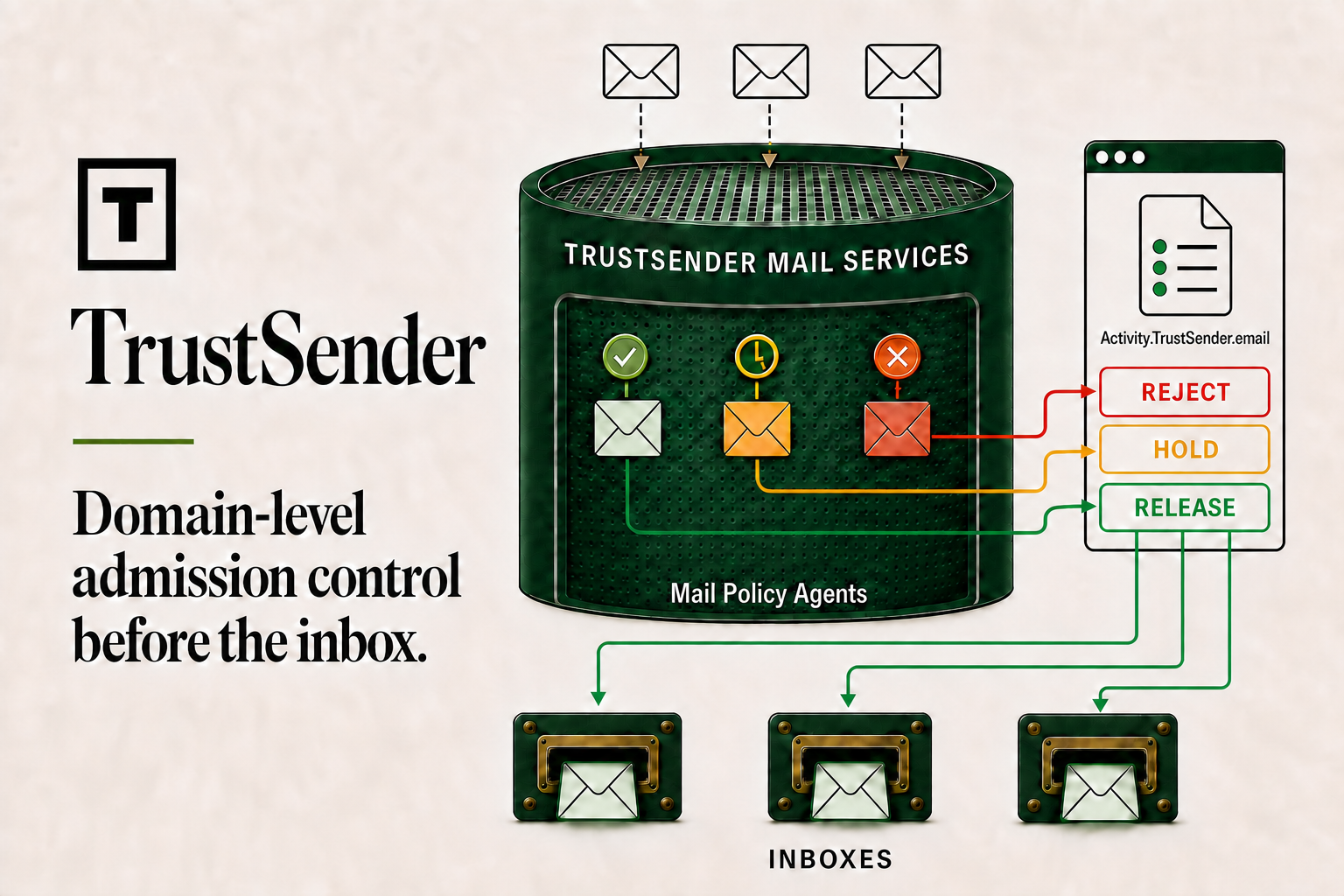
An Agent at the domain boundary. Interpret incoming telemetry before mail becomes inbox work.
Domain-level admission control before the inbox.
A boundary you can govern
Make the decision while delivery is still in progress.
Traditional filtering asks whether mail resembles abuse. TrustSender Mail Services interprets authenticated identity, relationship, purpose, context, and your organization's intent to decide whether the communication belongs.
External senderSMTP delivery
→Your domain boundaryTrustSender Mail ServicesAllow · Hold · Reject
→Allowed or released mailExisting inboxes
Built for the person responsible
A clearer conversation for domain operators.
Whether you run Microsoft 365, Google Workspace, another provider, or manage mail for clients, TrustSender makes the boundary, authority, and operational trade-offs explicit.
Technical owners responsible for routing, mail security, users, and service continuity.
Partners who need a governed, explainable boundary across customer domains.
Administrator controls
Agent direction with reasons, corrections, and accountability.
Mail-service policy
Define the intent, evidence, authority, constraints, and uncertainty behavior TrustSender uses for your organization.
Three delivery outcomes
Allow mail to the inbox, Hold it in Activity for the intended user, or Reject it at the boundary when authorized.
Explainable interpretation
See how the Agent read authentication, relationship, purpose, context, and policy evidence.
Correctable decisions
Release or reject held mail, correct relationships, or revise the Agent definition while keeping an auditable record.
What changes
The inbound route.
- A pilot domain points its mail-delivery records to the TrustSender boundary.
- TrustSender Mail Services interprets incoming telemetry and records one Allow, Hold, or Reject disposition.
- Activity shows the interpretation and lets the intended user release or reject held mail.
What can stay
Your inbox experience.
- Users keep the custom-domain addresses they already know.
- Allowed and user-released messages continue into the agreed downstream mail experience.
- The first pilot is deliberately low risk, human-reviewed, and reversible.
A controlled domain pilot
Understand the boundary before changing it.
- 01Assess
Review the domain, current provider, mail volume, DNS control, and unwanted-mail scenario.
- 02Define
Agree on policies, recipients, review responsibilities, success measures, and rollback conditions.
- 03Pilot
Use one low-risk domain, review every decision, and correct the system with visible evidence.
Request a domain assessment
Start with the domain you manage.
Tell us how mail reaches your organization today and what you want the boundary to prevent. Submitting this form does not change your DNS or commit you to a pilot.
- One low-risk custom domain
- Current provider and mail-volume review
- Human-approved routing and rollback plan